
German VAT Return (UStVA) 2026: Step-by-Step Guide
Complete guide to the German VAT return (UStVA) 2026: ELSTER walkthrough, filing thresholds, input tax deduction, the new form code 500, and how to avoid common mistakes.
- Category
- Taxes
- Updated
- Author
- Diana
Key Takeaways
- The UStVA reports your collected VAT minus input tax to the Finanzamt — the difference is your payable amount (or a refund).
- Filing frequency in 2026: monthly if your prior-year VAT liability exceeded 9,000 EUR, quarterly between 2,000 and 9,000 EUR, exempt at or below 2,000 EUR.
- Deadline: the 10th of the month following the reporting period, electronically via ELSTER only. Paper filing is not accepted.
- New in 2026: form code 500 (Kennzahl 500) replaces the former Kennzahl 23 for "supplementary information on the return."
- Key field codes: 81 (revenue at 19 %), 86 (revenue at 7 %), 66 (input tax), 83 (payable amount).
What Is the VAT Return (UStVA)?
The Umsatzsteuervoranmeldung (UStVA) is the preliminary VAT return that every VAT-registered freelancer, sole trader, or company in Germany must file with the tax office (Finanzamt). Its purpose is straightforward: you report the VAT you collected on your invoices and the VAT you paid on business expenses during a given period, then either remit the difference or claim a refund.
The return is a prepayment of VAT. Instead of settling everything once a year, the Finanzamt receives regular payments. At the same time, you offset the input tax — the VAT you paid on business expenses — against the VAT you collected. The result is your Zahllast (you pay the Finanzamt) or a Guthaben (the Finanzamt refunds the surplus).
For what VAT itself is and when you must charge it, see our guide to VAT in Germany; for the rates and the maths, see VAT rates and calculation.
Who Has to File — and How Often?
Anyone who supplies VAT-taxable goods or services must file a UStVA. Small businesses under § 19 UStG are exempt as long as they use the small-business regulation (Kleinunternehmerregelung): they charge no VAT and therefore file no UStVA.
How often you file depends on your prior-year VAT liability. Under § 18 (2) UStG the calendar quarter is the default reporting period:
| Prior-year VAT liability | Reporting period |
|---|---|
| Up to 2,000 EUR | Exemption possible — annual return only |
| 2,000 EUR to 9,000 EUR | Quarterly |
| Above 9,000 EUR | Monthly |
The monthly threshold was raised from 7,500 EUR to 9,000 EUR by the Fourth Bureaucracy Relief Act (BEG IV), effective 1 January 2025 — and it applies in 2026 too. The exemption threshold was likewise raised from 1,000 EUR to 2,000 EUR. Below that, the Finanzamt can release you from filing preliminary returns; you then submit only the annual return.
The rule that once required newly registered businesses to file monthly during their first two calendar years is suspended for 2021–2026. In those years new businesses also follow the general rule and are classified by their expected VAT in the founding year — usually quarterly.
What's New in 2026?
On 29 December 2025 the Federal Ministry of Finance published new form templates for the 2026 UStVA. The central change is form code 500 (Kennzahl 500) in line 55, "supplementary information on the return" (Ergänzende Angaben zur Steueranmeldung). From the 2026 assessment period it replaces the former flat Kennzahl 23.
Whereas the old Kennzahl 23 was a simple flag, the new Kennzahl 500 lets you choose a value from 1 to 4 to signal to the Finanzamt why your case needs a closer look:
| Selection value | Meaning | When it applies |
|---|---|---|
| 1 | Matters not yet clarified | A tax-relevant matter could not be conclusively assessed at submission time |
| 2 | Deviating legal opinion | You deliberately depart from administrative guidance (BMF letters, UStAE) |
| 3 | Request for manual review | You ask for personnel processing, e.g. with an unusually high input-tax surplus |
| 4 | Multiple selection | More than one of reasons 1–3 applies at the same time |
Important: selecting a value does not replace a substantive explanation. You still have to describe the matter in a separate attachment — for example via an ELSTER message or a cover letter. In addition, any entry in Kennzahl 500 removes your return from automated processing and routes it to a caseworker for individual review. Use it deliberately, not routinely.
The filing deadlines do not change in 2026: the UStVA remains due by the 10th of the following month (with a permanent deadline extension, by the 10th of the month after that). The electronic filing mandate via ELSTER also remains — paper filing is not permitted.
Official UStVA form (current edition)
The official German advance VAT return form as a PDF — to understand, prepare, and file away.
Step by Step: Filing Your UStVA in ELSTER
Filing via ELSTER is the standard route for every self-employed person in Germany. Here are the five steps in detail:
Step 1: Create or log in to your ELSTER account
If you do not have an ELSTER account yet, register at elster.de. Registration takes a few days because an activation code is sent to you by post. Have your tax number (Steuernummer) and certificate ready before you start.
Step 2: Select "Umsatzsteuervoranmeldung"
After logging in, navigate to "Formulare & Leistungen" → "Alle Formulare" → "Umsatzsteuer" → "Umsatzsteuervoranmeldung." Pick the correct reporting period (month or quarter) and the year 2026.
Step 3: Enter your revenues
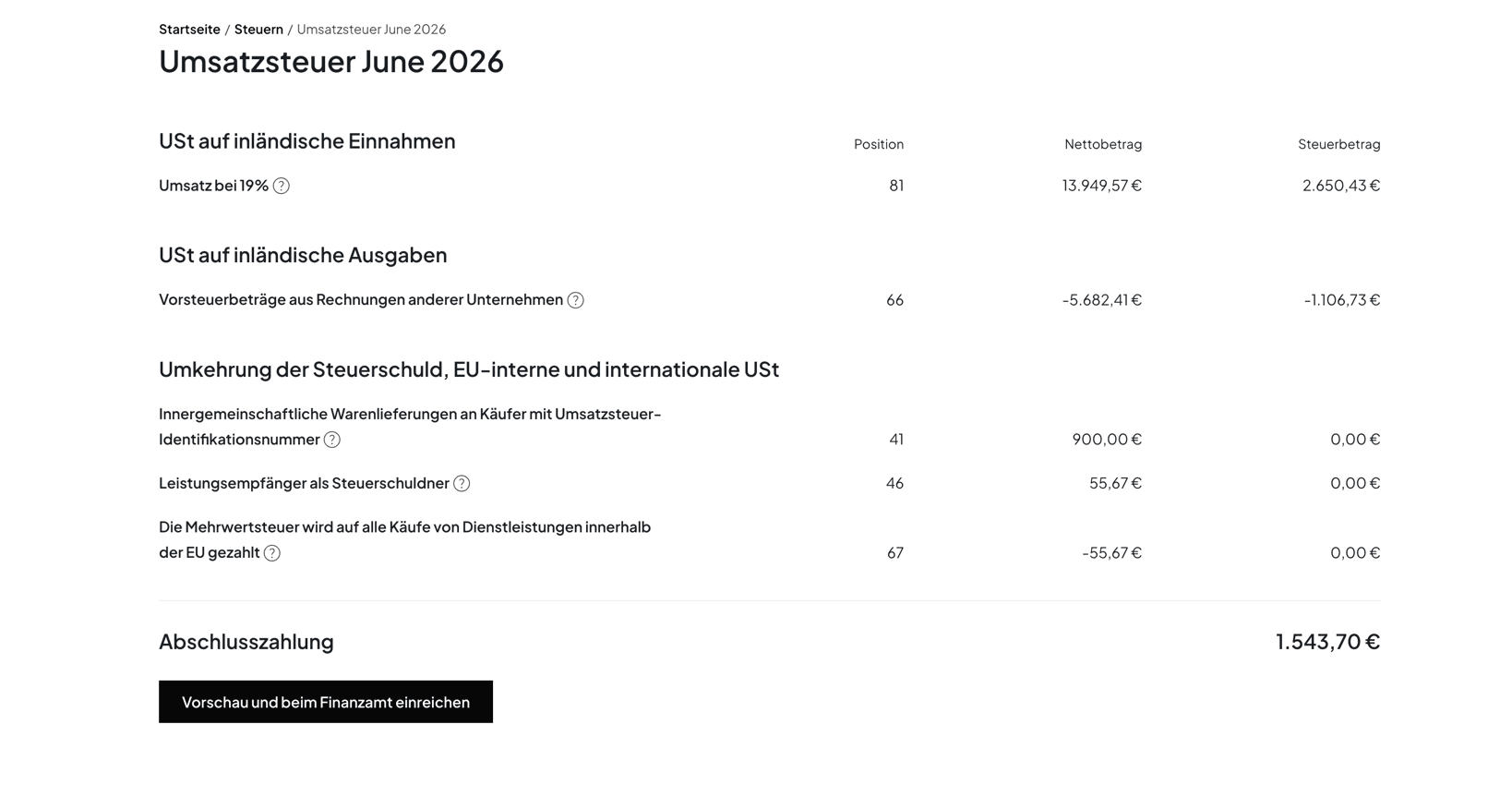
Enter your taxable supplies as net amounts in the relevant field codes. The most important are Kennzahl 81 for supplies at the standard 19 % rate and Kennzahl 86 for the reduced 7 % rate. Intra-Community supplies and exempt supplies are recorded in separate field codes.
Step 4: Enter your input tax
Enter the input tax from your incoming invoices in Kennzahl 66. This is the total VAT that other businesses charged you and that you can claim back. Make sure every invoice meets the legal requirements of § 14 UStG.
Step 5: Calculate the payable amount and submit
ELSTER calculates the payable amount automatically (VAT minus input tax) and shows it in Kennzahl 83. Review the summary carefully and submit the return. Payment is made by direct debit or bank transfer. If your input tax exceeds the VAT collected, you receive a refund from the Finanzamt.
The Key Field Codes at a Glance
The ELSTER form has over 100 fields, but only a handful matter for most self-employed people. These are the field codes you should know:
| Field code | Meaning |
|---|---|
| 81 | Supplies at the standard 19 % rate (net) |
| 86 | Supplies at the reduced 7 % rate (net) |
| 35 / 36 | Supplies at other tax rates |
| 66 | Deductible input tax from invoices |
| 61 | Input tax from intra-Community acquisitions |
| 83 | Remaining VAT prepayment (payable amount) |
| 500 | Supplementary information on the return (new from 2026) |
How the official form is structured and where to get it as a PDF is covered in our article on the advance VAT return form (USt 1 A).
Using Input Tax Deduction
Input tax deduction (Vorsteuerabzug) is one of the most important tools for lowering your actual tax burden. As a rule, you can deduct the VAT that other businesses charged you for business-related supplies. Typical deductible items include:
- Office supplies and work equipment
- Software and cloud services (e.g. accounting software)
- Business travel and mileage
- Office rent
- Telecommunications and internet
Requirement: you need a proper invoice with separately stated VAT under § 14 UStG: seller name and address, your name and address, the invoice date, a sequential invoice number, a description of the goods or services, the net amount, the VAT rate, and the VAT amount. Invoices without correct VAT details do not entitle you to a deduction. Keep all receipts for at least ten years — ideally digitally. For best practices, read our guide on receipt management in Germany.
Deadlines, Permanent Extension, and Payment
The UStVA is due by the 10th of the following month — for both monthly and quarterly filers. If the 10th falls on a weekend or public holiday, the deadline moves to the next business day.
If that is too tight, you can apply for a permanent deadline extension (Dauerfristverlängerung), which pushes the filing and payment deadline back by one month. Monthly filers must make a special advance payment (Sondervorauszahlung) of 1/11 of the previous year's VAT prepayments; it is offset against the December return. Quarterly filers owe no special advance payment. For a full calendar of all dates, see our VAT deadlines 2026 overview.
If you miss the deadline, the Finanzamt can impose a late-filing penalty (Verspätungszuschlag). For the UStVA — a tax return covering a prepayment — this is discretionary (§ 152 AO): up to 10 % of the assessed tax, but no more than 25,000 EUR. The automatic minimum of 0.25 % per month does not apply to preliminary returns.
Common Mistakes
Even experienced freelancers slip up on the UStVA. Here are the pitfalls to watch out for:
- Wrong field codes. Entering 19 % revenues in KZ 86 (the 7 % field) or vice versa is one of the most frequent errors. Always verify the VAT rate before filling in each line.
- Forgotten input tax. Failing to claim deductible VAT in KZ 66 means you overpay the Finanzamt. Keep your receipts organised so nothing is missed.
- Gross instead of net. The UStVA takes net amounts, not gross. ELSTER calculates the tax from the net figures you enter.
- Incomplete invoices. Claiming input tax on an invoice that lacks required details can be rejected during an audit.
- Missed deadlines. Late submissions can trigger a Verspätungszuschlag. Set calendar reminders to stay on track.
Made a typo or forgot an invoice? A faulty return can be corrected — our guide shows how to correct a German VAT return.
The tax rule we're most tired of reciting: even if you had no revenue and no business activity, you still have to file – it doesn't matter whether it's a monthly VAT return or the annual EÜR. We keep saying it, the self-employed keep not doing it, they get a letter from the Finanzamt – and then still ask us whether they really need to file.
 Peter BoykoFounder of Norman
Automate Your VAT Return with Norman
Filing the UStVA manually every month is time-consuming and error-prone. Norman eliminates both problems.
- Automatic recognition of revenue and input tax: Norman reads your bank transactions and receipts and assigns revenues and input-tax amounts to the correct field codes.
- Automatic ELSTER submission: the finished return is transmitted straight to ELSTER — no manual typing, no separate ELSTER login.
- Receipt matching and categorisation: incoming invoices are scanned, categorised, and matched to expenses, so no input tax is lost.
- Up-to-date forms: changes like the new Kennzahl 500 are already built in — you don't have to track updates yourself.
- Deadline monitoring: Norman reminds you of upcoming filing dates so you never miss a deadline or trigger a penalty.
Frequently Asked Questions
Who has to file a German VAT return?
Every VAT-registered freelancer and business. The only exemptions are small businesses under § 19 UStG and businesses whose prior-year liability was at most 2,000 EUR and that the Finanzamt has released from the filing obligation.
How often do I have to file the UStVA?
It depends on your prior-year VAT liability: above 9,000 EUR monthly, between 2,000 and 9,000 EUR quarterly, up to 2,000 EUR an exemption is possible. New businesses usually file quarterly.
What is form code 500 in the 2026 UStVA?
Kennzahl 500 is a new field from 2026 for "supplementary information on the return." It replaces the former Kennzahl 23 and lets you choose values 1–4 to indicate that a matter is unclear, that you deviate from administrative guidance, or that you request manual review.
What happens if I file the UStVA late?
The Finanzamt can impose a discretionary late-filing penalty of up to 10 % of the assessed tax, capped at 25,000 EUR. Repeated lateness raises the likelihood that a penalty is actually charged.
Can I file the UStVA without a tax advisor?
Yes. You can complete the UStVA yourself directly in ELSTER, or use accounting software like Norman that builds the form automatically and transmits it to ELSTER. A tax advisor is not required.
What's the difference between the UStVA and the annual VAT return?
The UStVA is a periodic prepayment (monthly or quarterly). The annual VAT return summarises all supplies after year-end and reconciles the prepayments already made with the actual annual VAT.
Conclusion
The German VAT return does not have to be complicated. With the new Kennzahl 500, 2026 adds a differentiated field for special cases, but the basic process stays the same: capture revenue and input tax, calculate the payable amount, and file on time via ELSTER. Pay particular attention to the correct field codes (81, 86, 66, 83) and don't forget to claim all your input tax.
If you would rather skip the manual work entirely, let an AI-powered accounting tool like Norman handle the whole UStVA process — from capturing receipts to submitting to ELSTER. That leaves you more time for your core business.
Norman handles the operational finance work behind the scenes
From invoicing to bookkeeping, Norman keeps recurring finance work organized so you can stay on top of deadlines with less manual effort.