
How to Create an XRechnung in Germany 2026: 5 Steps and the Leitweg-ID
An XRechnung is pure XML — you can't write it by hand. This guide shows step by step how to generate one, enter the Leitweg-ID, validate it, and send it to public authorities or B2B customers.
- Category
- Invoicing
- Updated
- Author
- Diana
In a nutshell: creating an XRechnung
- What it is: An XRechnung is a pure XML file based on EN 16931 — with no visible PDF view. It is mandatory for invoices to public authorities (B2G) and a valid e-invoice format for B2B.
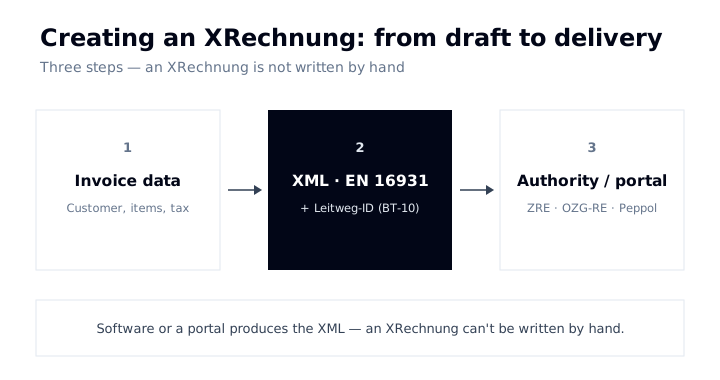
- You can't write it by hand: You generate an XRechnung with invoicing software, an online generator, or Germany's federal invoice portals (ZRE/OZG-RE). The current standard is XRechnung 3.0.
- Don't forget the Leitweg-ID: For invoices to authorities you enter the recipient's Leitweg-ID in the "Buyer Reference" field (BT-10). Without it the invoice is rejected.
- Validate, then send: Check the file before sending (e.g. with the KoSIT validator), then transmit it via Peppol, email, or a portal.
- Free with Norman: You fill in your usual invoice form and Norman generates the compliant e-invoice format automatically — at no extra cost.
What is an XRechnung — and when do you need one?
XRechnung is Germany's standard for electronic invoices to public administration. Technically it is a structured XML file that holds all invoice data in machine-readable form and conforms to the European standard EN 16931. In specialist terms, XRechnung is the German "CIUS" (Core Invoice Usage Specification) of that standard — the national flavour of the EU norm.
Unlike a PDF invoice, there is no visual layout: open the file and you see XML code, not a neatly formatted invoice. It only becomes readable through software or a viewer.
You need an XRechnung in two situations:
- B2G (mandatory): For invoices to federal authorities and many public bodies, XRechnung is required — at federal level it has been since 2020.
- B2B (valid): Since 1 January 2025, Germany's e-invoicing mandate applies to domestic B2B. XRechnung satisfies it because it is EN 16931-compliant — as an alternative to the hybrid ZUGFeRD format.
How the two formats differ technically and when to use which is covered in detail in XRechnung vs ZUGFeRD. This article is about the practical part: creating one.
Creating an XRechnung: the 5 steps
Step 1: Gather your data and mandatory fields
Before you open any tool, you need all invoice data complete. An XRechnung is checked automatically — if a mandatory field is missing, validation fails. You need:
- your full master data including tax number or VAT ID and bank details (IBAN)
- the recipient's full address
- for authorities: the recipient's Leitweg-ID (see below)
- invoice number, invoice date, and delivery/service date
- line items with net amounts, tax rate, and tax amount
- a payment term (e.g. payment due date) — a mandatory element in B2G
Step 2: Choose the right route
There are three common ways to generate an XRechnung:
| Route | Best for | Cost | Validation |
|---|---|---|---|
| Invoicing software (e.g. Norman) | Anyone who invoices regularly | often free | built in |
| Online generator | One-off invoices, occasional use | free to cheap | varies by provider |
| Federal portal (ZRE/OZG-RE) | Pure B2G invoices to the federal level | free | built in |
For ongoing business, software is the most practical route: you maintain customers and items once and generate every further invoice in the right format with a click. The federal portals make sense if you only invoice authorities occasionally.
Step 3: Generate the invoice as XML
In your chosen tool you fill in the invoice form as usual. The software converts your entries into a valid XRechnung XML — in one of the two permitted syntaxes (UBL or UN/CEFACT CII). You don't need to touch the XML structure yourself; what matters is that all the fields from step 1 are filled cleanly.
Step 4: Validate the XRechnung
Before sending, check the file. The official KoSIT validator (from the Coordination Office for IT Standards) verifies whether your XML matches the current XRechnung specification. It exists as a tool and as free online validators. Good invoicing software validates as it creates, so this step happens invisibly for you.
Step 5: Transmit the XRechnung
You send the finished XML file through one of these channels, depending on the recipient:
- Peppol: the standardised network for the secure exchange of e-invoices — common in B2G and increasingly in B2B.
- Federal portals (ZRE/OZG-RE): for invoices to federal administration; you upload the XML or enter it directly.
- Email: common in B2B — the XML (or a ZUGFeRD file) arrives as an attachment in the recipient's inbox.
The Leitweg-ID: the heart of a B2G XRechnung
When you invoice an authority, the Leitweg-ID is the most important field. It is a unique identifier that the invoice portal uses to route the invoice to the right place inside the administration. Technically it sits in the BT-10 "Buyer Reference" field of the XRechnung.
Three things to know:
- You don't invent it. The Leitweg-ID belongs to the recipient. The authority is obliged to give it to you — it usually appears in the order or purchase document.
- It's not optional. If the Leitweg-ID is missing or wrong, the portal rejects the invoice. This is the most common reason a B2G XRechnung fails.
- Check the format. The Leitweg-ID has a fixed structure (coarse, fine, and check digits). Enter it exactly as the authority states it.
In pure B2B you don't need a Leitweg-ID — a correct buyer reference or purchase-order number is enough if the customer asks for one.
Mandatory content of an XRechnung
An XRechnung must first contain all the mandatory invoice fields under § 14 UStG — the same ones that apply to a classic invoice. On top of that, the structured format expects some fields particularly strictly:
| Field | Why it matters |
|---|---|
| Tax number / VAT ID | Mandatory; the most common cause of rejected invoices when missing |
| Leitweg-ID (BT-10) | Mandatory in B2G; routes the invoice to the authority |
| IBAN / payment data | a dedicated mandatory field in the structured format |
| Payment terms | a payment due date or condition must be present |
| Units & tax rates | machine-readable and correctly coded per line item |
Because the check is automatic, an XRechnung is less forgiving than a PDF: a forgotten field doesn't produce an "ugly" invoice — it produces a rejected one.
Creating an XRechnung for free — what are the options?
Creating an XRechnung doesn't have to cost anything:
- Federal portals (ZRE/OZG-RE): For pure B2G invoices you can use the federal portals' web entry for free. Handy for one-offs, but without customer or item management.
- Online generators: Several providers generate individual XRechnungen for free in the browser. Make sure the output is validated against the current XRechnung version.
- Invoicing software with a free plan: Solutions like Norman create XRechnung and ZUGFeRD as part of normal — free — invoicing. You also get customer management, sequential numbering, and GoBD-compliant archiving.
If you write more than one or two invoices a year, software is the most relaxed route: it remembers your master data, validates automatically, and sends through the right channel.
XRechnung or ZUGFeRD — which to use?
In short: for authorities, XRechnung is the safe standard. For B2B customers who also want to see the invoice as a PDF, ZUGFeRD is often the more practical choice, because it combines a human-readable PDF with embedded XML. Both formats are EN 16931-compliant and satisfy the e-invoicing mandate. The full comparison is in XRechnung vs ZUGFeRD.
Frequently asked questions (FAQ)
Can I create an XRechnung with Word or Excel?
No. An XRechnung is structured XML based on EN 16931. A file created in Word or Excel — even exported as a PDF — is not an e-invoice in the legal sense. You need software, an online generator, or a portal that produces the XML correctly.
How do I open and read an XRechnung?
You can't meaningfully read a pure XRechnung XML without help. Use an XRechnung viewer or accounting software that converts the XML into a readable view. How to process incoming e-invoices is covered in Receiving e-invoices.
Is XRechnung mandatory for small businesses (Kleinunternehmer)?
Small businesses under § 19 UStG must be able to receive e-invoices, but are permanently exempt from issuing them (§ 34a UStDV). If you voluntarily invoice an authority as a small business, you still need a correct XRechnung including the Leitweg-ID.
What does it cost to create an XRechnung?
Nothing, if you use the federal portals, a free online generator, or software with a free plan such as Norman. Costs only arise with paid e-invoicing tools or per-invoice models — which are unnecessary for most freelancers and small companies.
Where do I get the Leitweg-ID?
From the invoice recipient. The authority is obliged to tell you its Leitweg-ID; it usually appears in the order or purchase document. Never invent it — a wrong Leitweg-ID leads to rejection.
Conclusion
You don't create an XRechnung by hand — you use a tool that produces the EN 16931 XML for you. The five steps are always the same: gather data, choose a route, generate the XML, validate, transmit. In B2G the Leitweg-ID is the decisive field; in B2B an EN 16931-compliant file is enough. Pick a tool that validates automatically and sends through the right channel, and the dreaded XML becomes a matter of minutes. Read on: Create a ZUGFeRD invoice · XRechnung vs ZUGFeRD · Germany's e-invoicing mandate 2026
Create an XRechnung for free — with Norman
With Norman you create EN 16931-compliant e-invoices such as XRechnung and ZUGFeRD for free — no separate e-invoicing module and no per-invoice fee. Incoming e-invoices are received and processed for free too, archived in a GoBD-compliant way. You just fill in the usual invoice form; the compliant format is generated automatically.