
How to Create a ZUGFeRD Invoice in Germany 2026: Guide, Profiles and Free Tools
A ZUGFeRD invoice is a PDF with embedded XML — readable by both humans and machines. This guide shows how to create one, which profile you need, and how it satisfies Germany's e-invoicing mandate.
- Category
- Invoicing
- Updated
- Author
- Diana
In a nutshell: creating a ZUGFeRD invoice
- What it is: ZUGFeRD is a hybrid format — a PDF/A-3 with embedded XML. The invoice is human- and machine-readable at the same time and satisfies the e-invoicing mandate.
- How it's made: Software produces the visible PDF and firmly embeds the structured XML (per EN 16931) inside the file. You can't do this reliably by hand.
- Choose a profile: For valid invoices use at least the BASIC profile; in B2B, EN 16931 (formerly "Comfort") is standard. The MINIMUM and BASIC WL profiles are only booking aids, not real invoices.
- Sending: You send a ZUGFeRD file like any normal PDF — the recipient opens it as a PDF. Current version: ZUGFeRD 2.5.
- Free with Norman: You write the invoice as usual and the PDF with embedded XML is generated automatically — at no extra cost.
What is a ZUGFeRD invoice?
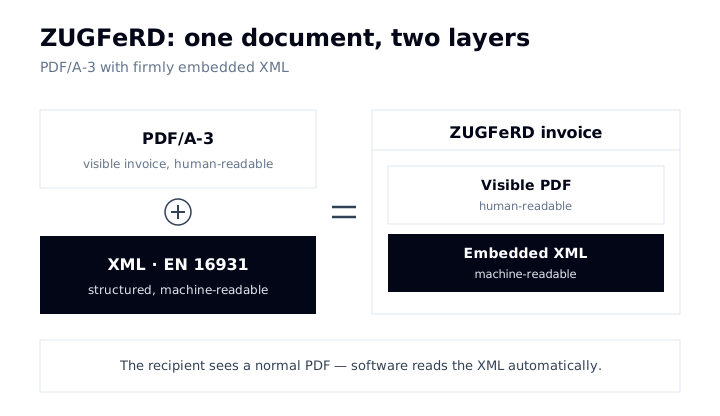
ZUGFeRD (Zentraler User Guide des Forums elektronische Rechnung Deutschland) is a standard for hybrid e-invoices. "Hybrid" means a single file holds two things at once:
- a PDF/A-3 that displays the invoice visually as usual — readable for humans;
- an embedded XML file based on the EN 16931 standard that holds all invoice data in structured, machine-readable form.
The recipient sees a normal PDF and can open, read, and archive it as always. Their accounting software reads the XML in parallel and books the data automatically. This dual nature is exactly why ZUGFeRD is so popular in B2B: you don't need to know whether your customer is already "e-invoice ready" — the PDF works either way.
How ZUGFeRD differs from the pure XML format XRechnung and when to use which is covered in the comparison XRechnung vs ZUGFeRD. This article is about creating one.
Creating a ZUGFeRD invoice: the 5 steps
Step 1: Invoice data and mandatory fields
As with any invoice, you first need all the mandatory fields under § 14 UStG: complete master data with tax number or VAT ID, the recipient's address, a sequential invoice number, invoice and service dates, line items with net amounts, tax rate and tax amount, plus your bank details. This data goes into both the visible PDF and the embedded XML — and the two must be identical.
Step 2: Choose the right profile
ZUGFeRD has several profiles that define how much data the XML contains. For a valid invoice, choose at least BASIC; in B2B, EN 16931 is the standard. The details are in the profiles section below.
Step 3: Generate the PDF and embed the XML
This is the actual ZUGFeRD step. Your software produces the visible PDF in PDF/A-3 format and firmly embeds the XML file inside it. Important: only PDF/A-3 allows binding embedding of attachments. A normal PDF or an older PDF/A-1 is not enough — a "PDF with XML next to it" is not a ZUGFeRD invoice. The software handles this embedding step fully automatically; you just click "create invoice".
Step 4: Validate
Before sending, check two things: that the PDF really is a PDF/A-3, and that the embedded XML conforms to EN 16931. Good invoicing software validates automatically as it creates; in addition, there are free online validators that check ZUGFeRD files.
Step 5: Send
You send a ZUGFeRD invoice like any normal PDF invoice — most often by email. The recipient needs no special software to open it. Because ZUGFeRD has been technically identical to the French Factur-X since version 2.1, you can send the same file to customers in France too.
ZUGFeRD profiles: which one do you need?
The profile decides how much structured data sits in the XML — and whether the file counts as a valid invoice at all. This is the most important decision when creating one:
| Profile | Content / suitability | E-invoice compliant? |
|---|---|---|
| MINIMUM | Only key totals, pure booking aid | No — not a valid invoice |
| BASIC WL | Without line items, booking aid | No — not a valid invoice |
| BASIC | All basic invoice data incl. line items | Yes — meets § 14 UStG |
| EN 16931 (formerly Comfort) | Full EU standard, B2B recommendation | Yes |
| EXTENDED | Extended for complex or industry-specific processes | Yes |
| XRECHNUNG | Reference profile matching the XRechnung standard (B2G) | Yes |
Remember one thing above all: MINIMUM and BASIC WL are not valid invoices for VAT purposes — they serve only as booking aids. If you want to send a real e-invoice, use BASIC or higher, and when in doubt, EN 16931. That keeps you on the safe side in B2B.
Turning an existing PDF into a ZUGFeRD invoice?
A common question: "I already have a nice PDF invoice — can't I just stuff some XML into it?" In principle yes, but only cleanly if the structured data matches the visible PDF exactly and the whole thing is a PDF/A-3. This is precisely where manual workarounds fall apart. The reliable route is the reverse: enter the invoice data once in software, and let it produce the PDF and the XML from the same source — so the two are guaranteed to match.
Creating a ZUGFeRD invoice for free
ZUGFeRD doesn't have to cost anything either:
- Online generators: Several tools create individual ZUGFeRD invoices for free in the browser. Watch for PDF/A-3 and a compliant profile (BASIC or higher).
- Invoicing software with a free plan: Solutions like Norman create ZUGFeRD invoices as part of normal — free — invoicing, including customer management and GoBD-compliant archiving. You also process incoming e-invoices for free.
For ongoing invoices, software has a clear edge: it produces the PDF and XML from one source, validates automatically, and archives in an audit-proof way.
ZUGFeRD and the e-invoicing mandate
ZUGFeRD is a valid e-invoice format because its compliant profiles conform to the EN 16931 standard. The timeline in brief: since 1 January 2025, all domestic B2B businesses must be able to receive e-invoices. The obligation to issue them phases in — from 2027 for businesses with prior-year turnover above €800,000, and from 2028 for everyone. A plain PDF emailed will then no longer count as an e-invoice. The full deadlines and exceptions (such as for small businesses) are in Germany's e-invoicing mandate 2026.
ZUGFeRD or XRechnung?
In short: for B2B customers who also want to see the invoice, ZUGFeRD is usually the most practical choice. For authorities (B2G), XRechnung is the safe standard — or you use the ZUGFeRD XRECHNUNG profile. Both formats are EN 16931-compliant. The full comparison is in XRechnung vs ZUGFeRD.
Frequently asked questions (FAQ)
Which ZUGFeRD profile should I use?
For normal B2B invoices, EN 16931 is the safe choice; BASIC is enough for simple invoices and meets § 14 UStG. You only need EXTENDED for complex processes. MINIMUM and BASIC WL are not valid invoices but pure booking aids.
Can I convert a normal PDF into a ZUGFeRD invoice?
Only cleanly if the structured data matches the visible PDF exactly and the file is a PDF/A-3. It's more reliable to generate the PDF and XML together from one software source — then the two are guaranteed to match.
Which ZUGFeRD version do I need?
Versions from 2.0.1 onward are valid. The current version is ZUGFeRD 2.5 (June 2026). In practice your software picks the version automatically; what matters most is a compliant profile.
Does ZUGFeRD satisfy the e-invoicing mandate?
Yes — as long as you use a compliant profile (BASIC, EN 16931, EXTENDED, or XRECHNUNG) and a PDF/A-3. Then the ZUGFeRD file is a fully valid e-invoice under EN 16931.
Can the recipient simply open a ZUGFeRD invoice?
Yes. That's the big advantage: a ZUGFeRD invoice is a normal PDF and opens in any PDF viewer. The embedded XML doesn't get in the way — it's only read by software.
Conclusion
You don't create a ZUGFeRD invoice by hand — you use software that produces the PDF and XML from one source and embeds the XML into a PDF/A-3. The most important decision is the profile — use BASIC or higher, ideally EN 16931 in B2B. The advantage over a pure XRechnung: your customer sees a familiar PDF, while your bookkeeping gets clean data. Read on: Create an XRechnung · XRechnung vs ZUGFeRD · Receiving e-invoices
Create ZUGFeRD invoices for free — with Norman
With Norman you create EN 16931-compliant e-invoices such as ZUGFeRD and XRechnung for free — no separate e-invoicing module and no per-invoice fee. Incoming e-invoices are received and processed for free too, archived in a GoBD-compliant way. You just fill in the usual invoice form; the PDF with embedded XML is generated automatically.